
This dialog allows you to assess the % variance explained or % sums of squares accounted for in the strata of a general analysis of variance (using the A%VARIANCE procedure).
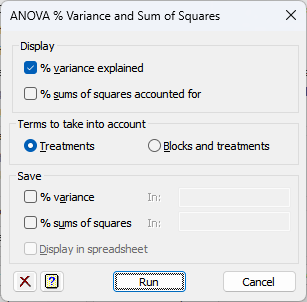
Display
This controls what results from the analysis are displayed in the Output window:
| % variance explained | % variance explained in each stratum |
| % sums of squares accounted for | % sums of squares accounted for in each stratum |
Terms to take into account
This option controls which terms are included to explain the variation.
| Treatments | Only the treatment terms estimated in the stratum concerned are included when accounting for its variance and sum of squares. |
| Treatments and blocks | Treatment terms and any block terms marginal the stratum are also included. |
Save
This lets you save results from the A%VARIANCE analysis in Genstat data structures. After selecting the appropriate boxes, you need to type the names for the identifiers of the data structures into the corresponding In: fields.
| % variance explained | Pointer | A pointer containing a scalar for each stratum giving the % variance explained. The pointer is labelled by the names of the strata. |
| % sums of squares accounted for | Pointer | A pointer containing a scalar for each stratum giving the % sums of squares accounted for. The pointer is labelled by the names of the strata. |
Display in spreadsheet
The saved results will be displayed in a new spreadsheet.
Action Icons
 |
Clear | Clear all fields and list boxes. |
 |
Help | Open the Help topic for this dialog. |
See also
- A%VARIANCE procedure