
Use this to select display options to be used for a regression or classification tree.
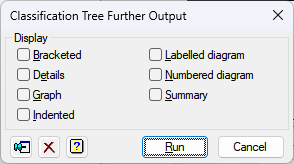
Display
Specifies which items of output are to be displayed in the Output window.
| Brackets | Display as used to represent an identification key in “bracketed” form (printed node by node). |
| Details | Gives detailed information about the nodes of the tree |
| Graph | Plots the tree |
| Indented | Display as used to represent an identification key in “indented” form (printed branch by branch) |
| Labelled diagram | Diagrammatic display including the node labels |
| Numbered diagram | Diagrammatic display with the nodes labelled by their numbers |
| Summary | Summary of the properties of the tree |
Action Icons
 |
Pin | Controls whether to keep the dialog open when you click Run. When the pin is up the dialog will remain open, otherwise when the pin is down  the dialog will close. the dialog will close. |
 |
Clear | Clear all fields and list boxes. |
 |
Help | Open the Help topic for this dialog. |
See also
- Regression Trees menu
- Classification Trees menu
- Tree Prune menu
- BREGRESSION procedure in command mode
- BCLASSIFICATION procedure in command mode
- BCIDENTIFY procedure in command mode
- BRPREDICT procedure in command mode