
Use this to save results from forming an experimental variogram in Genstat data structures.
- Type the names of the data structures into the In: fields. Initially, Genstat provides default names for some of these structures.
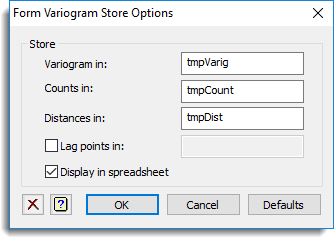
Save
| Variogram | Variate or matrix | Sample variogram |
| Counts | Variate or matrix | Numbers of comparisons involved in the calculation of each variogram |
| Distances | Variate or matrix | Mean lag distances at each step |
| Lag points | Pointer | Saves lag points, indices to z(x) and z(x+h), and associated direction |
Display in spreadsheet
Select this to display the results in a new spreadsheet window.
Action buttons
| OK | Save information and close dialog. |
| Cancel | Close dialog without making changes. |
| Defaults | Reset options to the default settings. |
Action Icons
 |
Pin | Controls whether to keep the dialog open when you click Run. When the pin is down the dialog will remain open, otherwise when the pin is up  the dialog will close. the dialog will close. |
 |
Restore | Restore names into edit fields and default settings. |
 |
Clear | Clear all fields and list boxes. |
 |
Help | Open the Help topic for this dialog. |
See also
- Form variogram menu
- Form variogram options
- Model variogram menu
- Krige menu
- FVARIOGRAM directive
- FCOVARIOGRAM directive for forming cross-variograms
- DVARIOGRAM procedure